前言
沛喆PZ-L8路由器刷机教程
接TTL
插好TTL,路由器主板上有标注引脚,VCC请不要接!!!
上电进u-boot
打开终端软件,配置:115200,8,无,1,无
路由器上电后快速按esc,中断uboot启动
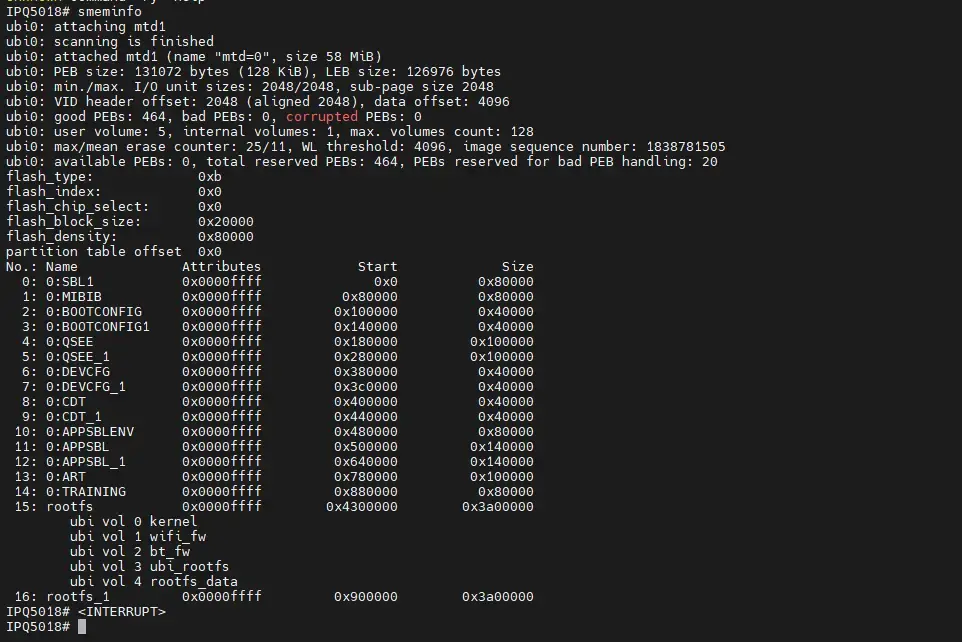
输入smeminfo查看初始分区
 1
 2
 3
 4
 5
 6
 7
 8
 9
10
11
12
13
14
15
16
17
18
19
20
21
22
23
24
25
26
27
28
29
30
31
32
33
34
35
36
37
38
39
40
|
IPQ5018# smeminfo
ubi0: attaching mtd1
ubi0: scanning is finished
ubi0: attached mtd1 (name "mtd=0", size 58 MiB)
ubi0: PEB size: 131072 bytes (128 KiB), LEB size: 126976 bytes
ubi0: min./max. I/O unit sizes: 2048/2048, sub-page size 2048
ubi0: VID header offset: 2048 (aligned 2048), data offset: 4096
ubi0: good PEBs: 464, bad PEBs: 0, corrupted PEBs: 0
ubi0: user volume: 5, internal volumes: 1, max. volumes count: 128
ubi0: max/mean erase counter: 25/11, WL threshold: 4096, image sequence number: 1838781505
ubi0: available PEBs: 0, total reserved PEBs: 464, PEBs reserved for bad PEB handling: 20
flash_type:             0xb
flash_index:            0x0
flash_chip_select:      0x0
flash_block_size:       0x20000
flash_density:          0x80000
partition table offset  0x0
No.: Name             Attributes            Start             Size
  0: 0:SBL1           0x0000ffff              0x0          0x80000
  1: 0:MIBIB          0x0000ffff          0x80000          0x80000
  2: 0:BOOTCONFIG     0x0000ffff         0x100000          0x40000
  3: 0:BOOTCONFIG1    0x0000ffff         0x140000          0x40000
  4: 0:QSEE           0x0000ffff         0x180000         0x100000
  5: 0:QSEE_1         0x0000ffff         0x280000         0x100000
  6: 0:DEVCFG         0x0000ffff         0x380000          0x40000
  7: 0:DEVCFG_1       0x0000ffff         0x3c0000          0x40000
  8: 0:CDT            0x0000ffff         0x400000          0x40000
  9: 0:CDT_1          0x0000ffff         0x440000          0x40000
 10: 0:APPSBLENV      0x0000ffff         0x480000          0x80000
 11: 0:APPSBL         0x0000ffff         0x500000         0x140000
 12: 0:APPSBL_1       0x0000ffff         0x640000         0x140000
 13: 0:ART            0x0000ffff         0x780000         0x100000
 14: 0:TRAINING       0x0000ffff         0x880000          0x80000
 15: rootfs           0x0000ffff        0x4300000        0x3a00000
        ubi vol 0 kernel
        ubi vol 1 wifi_fw
        ubi vol 2 bt_fw
        ubi vol 3 ubi_rootfs
        ubi vol 4 rootfs_data
 16: rootfs_1         0x0000ffff         0x900000        0x3a00000
|
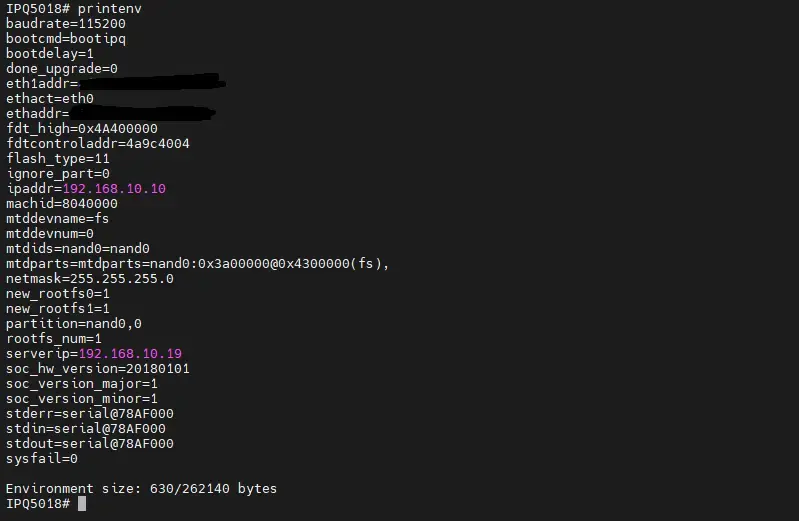
输入printenv查看初始启动参数
 1
 2
 3
 4
 5
 6
 7
 8
 9
10
11
12
13
14
15
16
17
18
19
20
21
22
23
24
25
26
27
28
29
30
31
32
33
|
IPQ5018# printenv
baudrate=115200
bootcmd=bootipq
bootdelay=1
done_upgrade=0
eth1addr=xxxx
ethact=eth0
ethaddr=xxxx
fdt_high=0x4A400000
fdtcontroladdr=4a9c4004
flash_type=11
ignore_part=0
ipaddr=192.168.10.10
machid=8040000
mtddevname=fs
mtddevnum=0
mtdids=nand0=nand0
mtdparts=mtdparts=nand0:0x3a00000@0x4300000(fs),
netmask=255.255.255.0
new_rootfs0=1
new_rootfs1=1
partition=nand0,0
rootfs_num=1
serverip=192.168.10.19
soc_hw_version=20180101
soc_version_major=1
soc_version_minor=1
stderr=serial@78AF000
stdin=serial@78AF000
stdout=serial@78AF000
sysfail=0

Environment size: 630/262140 bytes
|
配置TFTP服务
电脑网卡配置
ip地址:192.168.10.19
掩码:255.255.255.0
关闭防火墙
将ubi-JIKEAP_N3000.img固件放入根目录
TTL刷固件
电脑网口接路由器WAN,输入以下命令开始刷机
1
2
|
tftpboot ubi-JIKEAP_N3000.img
flash rootfs
|
提示OK后,断电重启
搞定
备用命令
IPQ5018# nand erase 0x900000 0x3a00000
IPQ5018# setenv bootargs
IPQ5018# setenv eth2addr
IPQ5018# setenv eth3addr
IPQ5018# setenv fsbootargs
IPQ5018# setenv mtdparts mtdparts=nand0:0x3a00000@0x4300000(fs),
IPQ5018# setenv mtdparts mtdparts=nand0:0x3a00000@0x900000(fs),
IPQ5018# saveenv